🏙 Tokyo Night
A dark and light Neovim theme written in Lua ported from the Visual Studio Code TokyoNight theme. Includes extra themes for Kitty, Alacritty, iTerm and Fish.
| Moon | Storm |
|---|---|

|
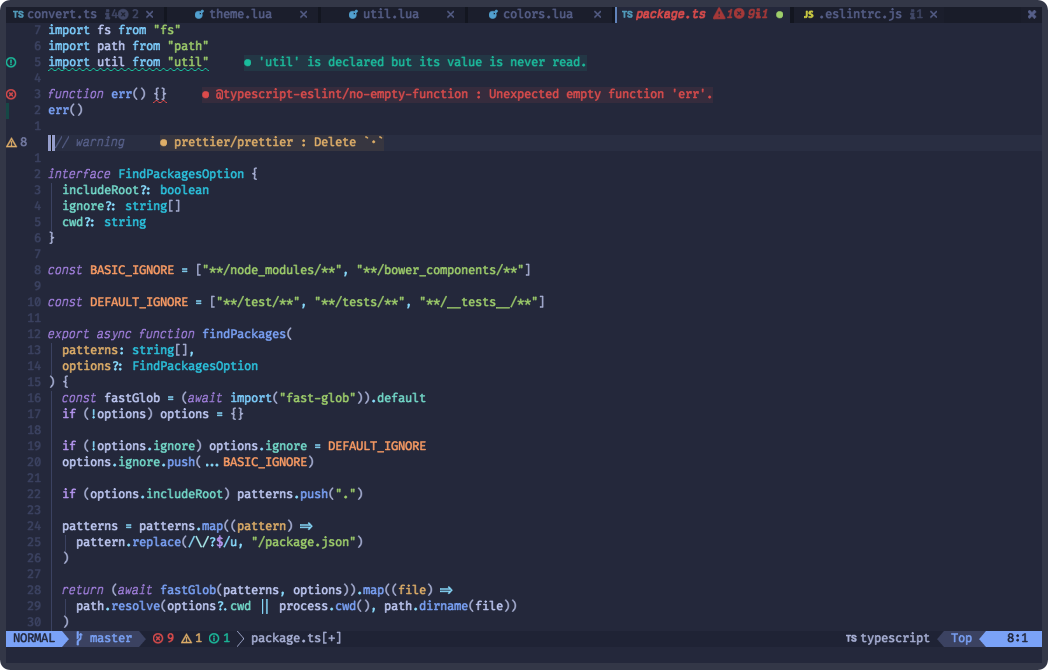
|
| Night | Day |

|

|
✨ Features
- Supports the latest Neovim 0.9.0 features.
- Terminal colors.
- Supports all major plugins.
- Provides TokyoNight extras for numerous other applications.
🎨 Supported Plugins
🍭 Extras
⚡️ Requirements
📦 Installation
Install the theme with your preferred package manager, such as folke/lazy.nvim:
{
  "folke/tokyonight.nvim",
  lazy = false,
  priority = 1000,
  opts = {},
}
🚀 Usage
vim.cmd[[colorscheme tokyonight]]
colorscheme tokyonight

" There are also colorschemes for the different styles.
colorscheme tokyonight-night
colorscheme tokyonight-storm
colorscheme tokyonight-day
colorscheme tokyonight-moon
Some plugins need extra configuration to work with TokyoNight.
Click here for more details
Barbecue
-- Lua
require('barbecue').setup {
  -- ... your barbecue config
  theme = 'tokyonight',
  -- ... your barbecue config
}
Lualine
-- Lua
require('lualine').setup {
  options = {
    -- ... your lualine config
    theme = 'tokyonight'
    -- ... your lualine config
  }
}
Lightline
" Vim Script
let g:lightline = {'colorscheme': 'tokyonight'}
⚙️ Configuration
Important
Set the configuration BEFORE loading the color scheme with colorscheme tokyonight.
The theme offers four styles: storm, moon, night, and day.
The day style is used when { style = "day" } is passed to
setup(options) or when vim.o.background = "light".
TokyoNight uses the default options,
unless setup is explicitly called.
Default Options
---@class tokyonight.Config
---@field on_colors fun(colors: ColorScheme)
---@field on_highlights fun(highlights: tokyonight.Highlights, colors: ColorScheme)
M.defaults = {
  style = "moon", -- The theme comes in three styles, `storm`, a darker variant `night` and `day`
  light_style = "day", -- The theme is used when the background is set to light
  transparent = false, -- Enable this to disable setting the background color
  terminal_colors = true, -- Configure the colors used when opening a `:terminal` in Neovim
  styles = {
    -- Style to be applied to different syntax groups
    -- Value is any valid attr-list value for `:help nvim_set_hl`
    comments = { italic = true },
    keywords = { italic = true },
    functions = {},
    variables = {},
    -- Background styles. Can be "dark", "transparent" or "normal"
    sidebars = "dark", -- style for sidebars, see below
    floats = "dark", -- style for floating windows
  },
  day_brightness = 0.3, -- Adjusts the brightness of the colors of the **Day** style. Number between 0 and 1, from dull to vibrant colors
  dim_inactive = false, -- dims inactive windows
  lualine_bold = false, -- When `true`, section headers in the lualine theme will be bold

  --- You can override specific color groups to use other groups or a hex color
  --- function will be called with a ColorScheme table
  ---@param colors ColorScheme
  on_colors = function(colors) end,

  --- You can override specific highlights to use other groups or a hex color
  --- function will be called with a Highlights and ColorScheme table
  ---@param highlights tokyonight.Highlights
  ---@param colors ColorScheme
  on_highlights = function(highlights, colors) end,

  cache = true, -- When set to true, the theme will be cached for better performance

  ---@type table<string, boolean|{enabled:boolean}>
  plugins = {
    -- enable all plugins when not using lazy.nvim
    -- set to false to manually enable/disable plugins
    all = package.loaded.lazy == nil,
    -- uses your plugin manager to automatically enable needed plugins
    -- currently only lazy.nvim is supported
    auto = true,
    -- add any plugins here that you want to enable
    -- for all possible plugins, see:
    --   * https://github.com/folke/tokyonight.nvim/tree/main/lua/tokyonight/groups
    -- telescope = true,
  },
}
🪓 Overriding Colors & Highlight Groups
How the highlight groups are calculated:
colorsare determined based on your configuration, with the ability to override them usingconfig.on_colors(colors).- These
colorsare utilized to generate the highlight groups. config.on_highlights(highlights, colors)can be used to override highlight groups.
For default values of colors and highlights, please consult the
storm,
moon,
night, and
day themes.
Settings & Changing Colors
require("tokyonight").setup({
  -- use the night style
  style = "night",
  -- disable italic for functions
  styles = {
    functions = {}
  },
  -- Change the "hint" color to the "orange" color, and make the "error" color bright red
  on_colors = function(colors)
    colors.hint = colors.orange
    colors.error = "#ff0000"
  end
})
Borderless Telescope
require("tokyonight").setup({
  on_highlights = function(hl, c)
    local prompt = "#2d3149"
    hl.TelescopeNormal = {
      bg = c.bg_dark,
      fg = c.fg_dark,
    }
    hl.TelescopeBorder = {
      bg = c.bg_dark,
      fg = c.bg_dark,
    }
    hl.TelescopePromptNormal = {
      bg = prompt,
    }
    hl.TelescopePromptBorder = {
      bg = prompt,
      fg = prompt,
    }
    hl.TelescopePromptTitle = {
      bg = prompt,
      fg = prompt,
    }
    hl.TelescopePreviewTitle = {
      bg = c.bg_dark,
      fg = c.bg_dark,
    }
    hl.TelescopeResultsTitle = {
      bg = c.bg_dark,
      fg = c.bg_dark,
    }
  end,
})
Fix undercurls in Tmux
To have undercurls show up and in color, add the following to your Tmux configuration file:
# Undercurl
set -g default-terminal "${TERM}"
set -as terminal-overrides ',*:Smulx=\E[4::%p1%dm'  # undercurl support
set -as terminal-overrides ',*:Setulc=\E[58::2::::%p1%{65536}%/%d::%p1%{256}%/%{255}%&%d::%p1%{255}%&%d%;m'  # underscore colours - needs tmux-3.0
🍭 Extras
Extra color configs for Kitty, Alacritty, Fish, WezTerm, iTerm and foot can be found in extras. To use them, refer to their respective documentation.

You can easily use the color palette for other plugins inside your Neovim configuration:
local colors = require("tokyonight.colors").setup() -- pass in any of the config options as explained above
local util = require("tokyonight.util")

aplugin.background = colors.bg_dark
aplugin.my_error = util.lighten(colors.red1, 0.3) -- number between 0 and 1. 0 results in white, 1 results in red1
🔥 Contributing
Pull requests are welcome! Please see CONTRIBUTING.md for guidelines on adding new extras and general contribution guidelines.