![main][main-badge] ![extra][extra-badge] ![codecov][codecov-badge]
Dunst
A highly configurable and lightweight notification daemon.

Table of Contents
Features
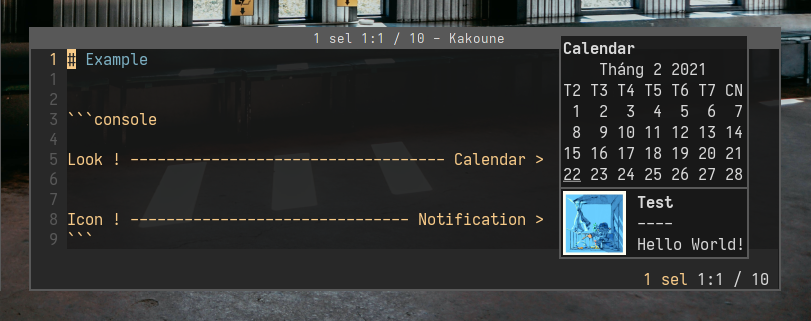
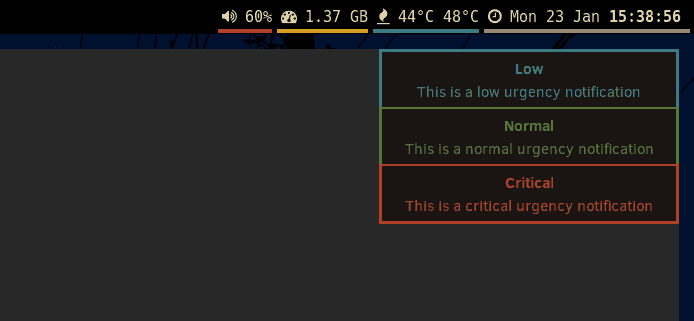
⚙️ Highly customizable
Customize fonts, icons, timeouts, and more. Are you unhappy with the default shortcuts and colors? No worries, you can change these all with a simple configuration file tweak.
click the images to see the dunstrc
📜 Scripting

Run custom scripts on notifications matching a specified pattern. Have espeak read out your notifications, or play a song when your significant other signs on in pidgin!
📋 Rules
Change the look or behavior of notifications matching a specified pattern. You could use this to change the color of message notifications from your favorite jabber buddies, or to prevent important work email notifications from disappearing until you manually dismiss them.
⏸️ Pause
If you want to take a break and not receive any notifications for a while, just pause dunst. All notifications will be saved for you to catch up later.
Additionally, you can set a numeric pause level, which allows you to pause dunst selectively for some notifications, where more urgent notifications get through, but less urgent stay paused.
🕘 History
Catch an unread notification disappearing from the corner of your eye? Just tap a keyboard shortcut to replay the last notification, or continue tapping to see your notification history.
Documentation
Most documentation can be found in dunst's man pages. In **dunst(1)** contains some general instructions on how to run dunst and in **dunst(5)** all of dunst's configuration options are explained.
On the dunst wiki you can find guides and installation instructions and on the dunst website there is a FAQ with common issues.
Installation
Dunst is available in many package repositories. If it's not available in your distro's repositories, don't worry, it's not hard to build it yourself.
Dependencies
- `gdk-pixbuf-2.0`
- `glib-2.0`
gio-2.0pangocairo(provided by pango + cairo)- `libnotify` (optional, for dunstify)
- `wayland-client` (optional, for wayland)
wayland-cursor(optional, for wayland)- `x11` (optional, for xorg)
- `xinerama` (optional, for xorg)
- `xext` (optional, for xorg)
- `xrandr` (optional, for xorg)
- `xscrnsaver` (optional, for xorg)
The names will be different depending on your distribution. See more here.
Building
Makefile
git clone https://github.com/dunst-project/dunst.git
cd dunst
make
sudo make install
Meson
meson setup build
ninja -C build
ninja -C build install
Custom Meson build parameters can be found in meson_options.txt.
Make parameters
DESTDIR=<PATH>: Set the destination directory of the installation. (Default:/)PREFIX=<PATH>: Set the prefix of the installation. (Default:/usr/local)BINDIR=<PATH>: Set thedunstexecutable's path (Default:${PREFIX}/bin)DATADIR=<PATH>: Set the path for shared files. (Default:${PREFIX}/share)BASHCOMPLETIONDIR=<PATH>: Set the path for installation of bash completion files. (Default:${DATADIR}/bash-completion/completions)FISHCOMPLETIONDIR=<PATH>: Set the path for installation of fish completion files. (Default:${DATADIR}/fish/vendor_completions.d)ZSHCOMPLETIONDIR=<PATH>: Set the path for installation of zsh completion files. (Default:${DATADIR}/zsh/site-functions)SYSCONFDIR=<PATH>: Set the base directory for system config files. (Default:${PREFIX}/etc/xdg)SYSCONFFILE=<PATH>: Set the absolute path to which the default dunstrc shall be installed. (Default:${SYSCONFDIR}/dunst/dunstrc)SYSCONF_FORCE_NEW=(0|1): Overwrite existing${SYSCONFFILE}. (Default: 0 (don't overwrite))MANDIR=<PATH>: Set the prefix of the manpage. (Default:${DATADIR}/man)SYSTEMD=(0|1): Disable/Enable the systemd unit. (Default: autodetect systemd)WAYLAND=(0|1): Disable/Enable wayland support. (Default: 1 (enabled))X11=(0|1): Disable/Enable X11 support. (Default: 1 (enabled))DUNSTIFY=(0|1): Disable/Enable the libnotify dunstctl utility. (Default: 1 (enabled))COMPLETIONS=(0|1): Disable/Enable installation of shell completions. (Default: 1 (enabled))SERVICEDIR_SYSTEMD=<PATH>: The path to put the systemd user service file. Unused, ifSYSTEMD=0. (Default:${PREFIX}/lib/systemd/user)SERVICEDIR_DBUS=<PATH>: The path to put the dbus service file. (Default:${DATADIR}/dbus-1/services)EXTRA_CFLAGS=<FLAGS>: Additional flags for the compiler.
Make sure to run all make calls with the same parameter set. So when building with make PREFIX=/usr, you have to install it with make PREFIX=/usr install, too.
Either X11 or WAYLAND should be set, otherwise dunst will not compile.
Notes on default of XDG_CONFIG_DIRS
Dunst uses a different default (${SYSCONFDIR}) for XDG_CONFIG_DIRS at runtime.
This is a slight digression from the recommended value in the XDG Base Directory
Specification (/etc/xdg), because the default config file gets installed to
${SYSCONFDIR}/dunst/dunstrc to avoid conflicts with /etc/xdg/dunst/dunstrc which
might have been installed from a distribution repository. If you do want dunst
to use the spec's recommended default, set XDG_CONFIG_DIR=/etc/xdg at runtime or
SYSCONFDIR=/etc/xdg at compile time.
Notes on SYSCONFFILE
Changing SYSCONFFILE does not affect the search for config files, meaning it will not take effect if you choose to install dunstrc to a location that cannot be found by the algorithm outlined in the FILES section of dunst(1).
make install will not overwrite an already existing ${SYSCONFFILE} (i.e.
/usr/local/etc/xdg/dunst/dunstrc), see SYSCONF_FORCE_NEW above. This is so you
do not lose local changes to said file on upgrade. However, it is recommended
to leave that file untouched and use a more important config location to
override settings, see the FILES section in dunst(1) for more details.
make uninstall will not remove ${SYSCONFFILE}, use make uninstall-purge if
you do want it removed as well.
Contributing
Contributions are very welcome. Before contributing, make sure to look at the contribution documentation in CONTRIBUTING.md.
Make sure you test your code and where possible add automated tests. These
tests are also checked on memory leaks (with make test-valgrind).
Bug reports
Please use the issue tracker provided by GitHub to send us bug reports or feature requests.
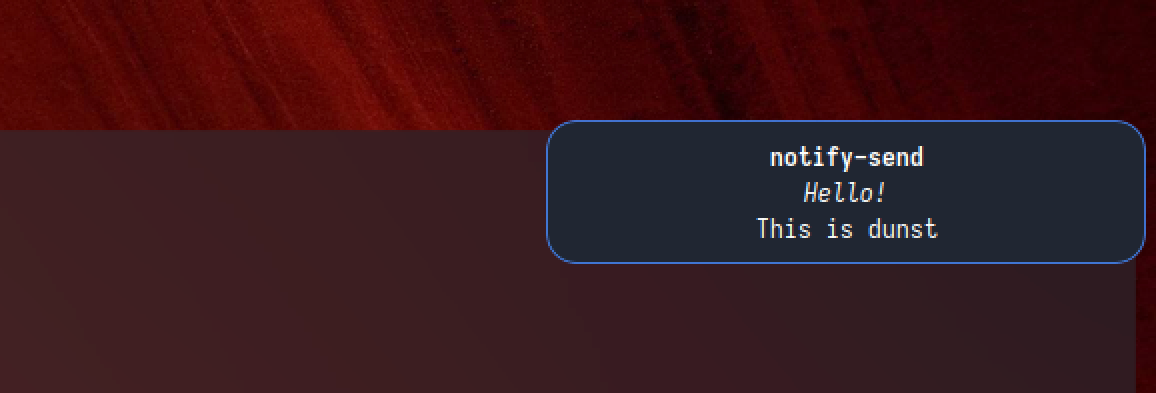
Screenshots

Maintainers
Please only refer to active maintainers for issues and bugs.
Ex-Maintainers
- Nikos Tsipinakis nikos@tsipinakis.com
- Benedikt Heine bebe@bebehei.de
- Bjoern Hiller bjoern.hiller@gmail.com
Author
Written by Sascha Kruse dunst@knopwob.de
Copyright
Copyright 2013 Sascha Kruse and contributors (see `LICENSE` for licensing information)